




















Showing posts with label Photography. Show all posts

Wednesday, September 30, 2015

National Geographic Kids Resources To Encourage Shutterbugs #NGKInsider


*This post may contain affiliate links. Please see my Disclosure Page for details.


This year my daughter asked to learn more about photography. I think she gets her love for taking photos from me. I often joke that my camera is practically an appendage. If you check out my Instagram feed you will see what I mean. My camera arsenal contains a Nikon D5100 dSLR and a Note 4 Camera Phone (which sadly I use more than my dSLR). From time to time I will let my little shutterbug use my Nikon DSLR camera, but it makes me nervous so this year for Christmas she is going to be getting her very own digital point and shoot camera....shhh don't tell her! However I am by no means a professional and still have a lot to learn about taking photos. And thanks to National Geographic Kids and their new book Guide To Photography and MyShot Program I now have some amazing resources to help my daughter (and myself) learn more about photography! After all learning along side my kids is my favorite thing about homeschooling.

Here are some further details about these two amazing resources from National Geographic.


Guide to Photography:
This 160 page soft page book was written by Nancy Honovich and contains photographs from Annie Griffiths a National Geographic Photographer. Annie is a long time National Geographic photographer and one of the first women photographers for the magazine. She has traveled to over 150 countries and photographed animals, landscapes and people from across the globe. Annie actually took time out of her busy schedule to talk with the National Geographic Insider team and share 5 Photography Tips for Kids. But before I get to those 5 tips let me finish telling you about the book which is where you can find ALL of her tips and tricks.


Guide to Photography is a great resource for kids who want to learn more about photography, it is also a great book for parents who want to learn more. The book contains tips and tricks for all camera types including smartphones, DSLR, point-and-shoot and even underwater cameras.

Contents:

  • Equipment Basics
  • Hold It Right And Focus
  • Seeing Through the Lens
  • Your Best Shot
  • Make Your Subject Rule

The book features easy to understand step-by-step instructions, color diagrams and sample photos, information on editing and photo sharing, DIY photography activities, tips from experts, photography careers, ways to connect through the National Geographic Kids photo sharing community MyShot and assignments from Annie Griffith to test your knowledge.

The Guide to Photography book can be picked up at your local bookstore or on Amazon and costs $14.99.

Annie Griffiths always had a passion for telling stories, but when she first started there wasn't much in the way of  kid friendly cameras. It wasn't until she was introduced to the camera in college that she found her passion for telling stories through photographs.

5 Photography Tips for Kids From Annie Griffiths

  1. Camera Choice - Have an old cellphone laying around? They can make a great first camera for kids! Most camera photos take great photos and if it's an older phone you are no longer using you don't have to worry too much about an accident occurring.
  2. Organization - Teach your child how to save and organize their photos (oh boy this is a tip I should listen and adhere to). Always name your pictures in a logical way so they are easy to find. When saving those photos, go through and delete any unwanted shots to free up space and make searching faster.
  3. Tell A Story - Encourage kids to use photos to tell stores. Ask them to take pictures the next time they're bored, to tell the story of their experience. It can be more than their literal interpretation of a thing.
  4. NO Chimping - Make a “No Chimping Rule” during outings. Chimping is the act of looking at your photos immediately after you take them and “oohing and ahahing” at every photo you took, something media professionals used to do shortly after digital photography was developed. Encourage your kids to experience the moment and not peek at their photos until the end of the event, outing, etc.
  5. Photo Editing - Let your child get creative with their photos by using photo editing programs like PicMonkey, Photoshop, Picasa, etc. Let them know that a photo editing program is like a dark room and that changing an image can be fun and great, but as a photojournalist, to tell a story, you never want to alter reality.  Don't use Photoshop to alter the true story in any way!
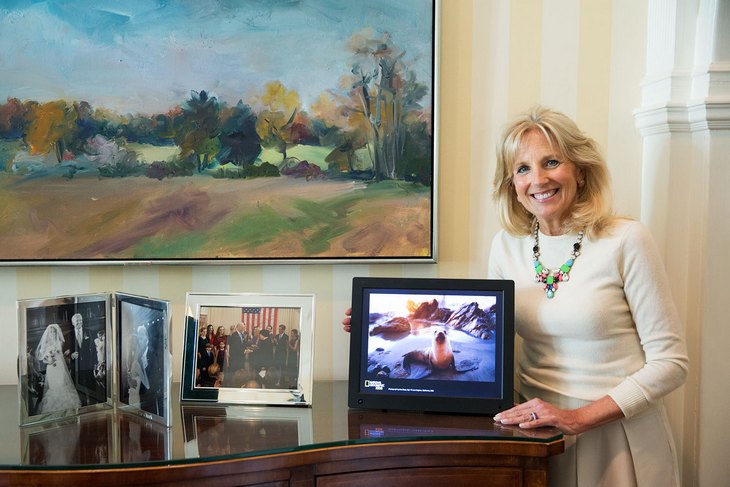
Image Via White House Photo by David Lienemann

MyShot Program:
My Shot is an online community of photos taken by children (average age is 9; max age is 17) that gives them a safe and secure place to share their work. Each month images are selected from the community that showcase settings, moments and beauty. Those photos then have the privilege of being displayed in the living room of the Vice President Joe Biden and his wife, Dr. Jill Biden's home, on a digital picture frame.

The partnership between Dr. Jill Biden and National Geographic Kids was announced in July of 2015 in dedication to celebrating the talent, creativity, and education of children!

“Joe and I are proud to bring the creativity of so many young photographers from across the country into our home and to see the world through their lens,” Dr. Biden gushed. “I am so impressed by the incredible talent and professionalism of these kid photographers, and I look forward to sharing their work with our family, friends and all those who visit the Vice President’s Residence.”

A couple of weeks ago I had the privileged of being on a conference call with Dr. Jill Biden who is a dedicated mother, grandmother, educator and Second Lady of the United States of America. She is so dedicated that she was grading papers two days after her husband was sworn in. Not only did she discuss her collaboration with the MyShots program but she also shared the import role parents and educators play in inspiring children to learn more about the world around them. She is truly passionate about getting children involved and said "As a teacher, mom and grandmother, I share your passion for encouraging our children to learn all about the world. Education has been my life's work." 

As a homeschool mom I really appreciated Dr. Biden's belief that parents and educators need to work together to help, guide and inspire children. I chose to keep my children at home for many reasons and one of them is that I feel the connection between parents and teachers is gone. Dr. Biden stated, “I think it’s up to the teachers and the parents to create that interest. Jill suggested several ways of sparking a passion, suggesting educators and parents work together and have a dialogue with kids about culture and geography by reading or watching quality programs that explore the world." 

One of the other things we discussed with Jill was how education has changed. Jill feels technology has become the biggest factor. She reminisced with us about her time in school as a little girl and even recalls the time she sat in the one room schoolhouse her grandmother used to teach at. Isn't that awesome? She still has the brass bell her grandmother used in her classroom! 

Jill is also passionate about women's issues and military families and has even written a book called "Don't Foget, God Bless Our Troops." She also works with closely with the National Geographic Bee a National Geographic competition designed to inspire students to be curious about the world.

To read more about Dr. Jill Biden and her work with the National Geographic MyShot go here.

So do you have a child interested in photography? If so be sure to check out these great resources. You never know your child could become a National Geographic Photographer one day!


Monday, September 22, 2014

What Living Beautifully Means To Our Family #SuaveFamilySelfie

*This post may contain affiliate links. Please see my Disclosure Page for details.


Beautiful - adj. having beauty; possessing qualities that give great pleasure or satisfaction to see, hear, thnk about, etc.; delighting the senses or mind. interj. wonderful; fantastic

What does "living beautifully" mean to you? Do you feel that your family is "living beautifully?" These are really important questions that you should ask yourself on a regular basis. Everyone's answer to these questions will be different, because one persons thoughts on "living beautifully" will not be the same as another's! Here is what it means for our family...

Our family is definitely "living beautifully"! However there are times that I don't always think that. Our family deals with struggles on a daily basis and I swear for every step forward we take, we take two back. I am not always the greatest mom and say things to my children that I later regret. I compare myself and even my children to others way to often. And I doubt some of the decisions my husband and I have made throughout the last 14 years.

But when the going gets tough and I start doubting whether or not we are "living beautifully" I try to focus my thoughts on the positive rather than the negative. Over the years I have gotten much better at this and I have also gotten better at not micro managing the future. On those tough days I remind myself why we are "living beautifully!" We have a house over our heads and the basic necessities to live comfortably. My husband has a secure job. I am able to be a stay at home/homeschool mom. My children and I are able to get out of the house every week for fun learning adventures. And I have the greatest kids and husband ever! Sure there are things I want to improve in our family and our lives, but it takes baby steps and it doesn't mean we aren't already "living beautifully".

Recently I found this quote on living which really inspired me on our journey...

“Living is a form of not being sure, not knowing what next or how. The moment you know how, you begin to die a little. The artist never entirely knows. We guess. We may be wrong, but we take leap after leap in the dark. —AGNES DE MILLE”  

Here are 25 things I do to help our family with "living beautifully":
  1. Define what "living beautifully" means to you and start taking the steps to get there.
  2. Spend time with family and friends on a weekly basis.
  3. Take a hike...literally get out and go exploring. Did you know that being in the outdoors can do wonders for stress?
  4. Appreciate the little things in life. 
  5. Live your own life and don't compare yourself to others. We are all special and individuals and do not fit in the same mold or box.
  6. Do something special for yourself. Go get a new hairdo, perhaps do something drastic like change your hair color. Go get a manicure or pedicure. Buy a new shirt. Whatever makes you happy!
  7. Discover your dreams and passions and go for them. You are never too old to make a change and do what you love.
  8. Remember that the road to living beautifully can be a long one and there will be ups, and downs. Take a look at where you are and the progress you have made and feel good at what you have accomplished. Make adjustments as needed, chances are your thought's on living beautifully will change over the years. 
  9. Count your blessings each and everyday and be happy with what you have. Sometimes the worst things can turn out to be blessings. I often talk about our foreclosure and bankruptcy as being a blessing. We found out our home had black mold and was causing a couple of us to have health issues. So we made the decision to leave immediately. We found an apartment to rent and moved what we could and sold the rest. The home was foreclosed on and we ended up having to file bankruptcy as well to make sure we were completely absolved from any mortgage debt. It ended up being a blessing because we were once again completely debt free which meant I was able to become a stay at home mom. 
  10. Smile. My son has an amazing way of making me smile even on the worst days. 
  11. Express yourself. Writing posts for my blog has done wonders for my self esteem!
  12. Hug and/or kiss someone you love. Even us non-physical touchers need a hug sometimes!
  13. Learn something new every day. Because of my amazing, inquisitive children I am always learning something new.
  14. Remember the 3 L's - Live, laugh, love and learn! 
  15. Embrace your imperfections. Guess what no one is perfect in this world. 
  16. Help others. Helping others in need and volunteering can do wonders for the soul!
  17. Don't dwell on the past, do not dream of the future, concentrate on the present.
  18. Be forgiving. I cannot tell you how many times a day our family asks each other for forgiveness.
  19. Have perspective, but don't be afraid to be flexible on your point of view. It is important to explore multiple perspectives and adapt to new situations.
  20. Expect the best not the worst. This is a hard one for me because well every week something bad seems to happen.
  21. Travel whenever you can.
  22. Create a beautiful living space.
  23. Look and feel beautiful by taking care of your health and appearance. If you are anything like me you live more beautifully when you look and feel beautiful. Who doesn't love a new amazing hair cut and outfit?
  24. Have a purpose and direction in life!
  25. And lastly enjoy and capture the moments. You can start by taking a family selfie, then follow the instructions below to enter the #SuaveFamilySelfie - Living Beautifully To Live Better Sweepstakes.


Suave wants to see how is your family living beautifully? Take a photo of your family living beautifully and enter the Living Beautifully To Live Better Sweepstakes.

Image 1

Entering is easy and your family will be entered to win a Suave Friday Family Selfie prize pack.

Step 1: Take a family selfie (or use a recent one!)
Step 2: Post it on Instagram using these 3 hashtags: #suavefamilyselfie #LB2LB #Walmart
Step 3: Fill out this form and submit your Instagram link.

*To get your Instagram link visit instagram.com, log in, and find the link to your photo. It will be in the format of http://instagram.com/p/YOURPHOTOID.

*To retrieve the link from your Instagram mobile app, go to your profile picture on the app, click the "..." in the bottom right hand corner, and then select "Copy Share URL".

Enter the sweepstakes weekly to increase your chance of winning. Each week 6 new winners will be drawn to receive a $175 Walmart prize pack. Once you have submitted your image you will receive a coupon via email for $1 off Suave at Walmart. Sweepstakes ends  October 21, 2014.

Good Luck!


Thursday, November 14, 2013

BuildASign and Easy Canvas Prints Review - Great Gift Items

*This post contains affiliate links. Please see my Disclosure Page for details.


BuildASign.com is a leading online custom printing provider that is privately owned and based out of Austin, TX. Since 2005 the company has been helping customers create custom signage and home decor products using the BuildASign custom web-based technology. Each piece is guaranteed to be high quality and arrive at your door in with industry-leading speed. BuildASign.com also owns Easy Canvas Prints. Through the BuildASign.com Giving Program, the company has contributed more than $600,000 to over 500 local and national nonprofits. And they have received national recognition for their donation of more than 275,000 Welcome Home banners to friends and families of military service members returning home from a deployment.

A moms review:
I received a $50 coupon code to order whatever I wished from BuildASign.com, 250 business cards and a 8x10 canvas print from Easy Canvas Prints Below I will provide a breakdown of the creating, ordering and shipping process as well as my thoughts on each item I chose.

If you are in need of advertising materials for your business or product, or perhaps something fun and unique for your home decorating or car personalization needs BuildASign has you covered!

Just decide what you want to order and create your own customized product in a few short, simple steps.

They also have vinyl letters, window clings, flags and more!

After you decide on the exact product you'd like to create  (many products have multiple options such as size, layout, etc) you will be walked through each remaining step.


Next comes the fun part customization. You will have an option to choose a pre-done design which you can then customize or you can choose to start from scratch. I used both of these features. Everything is 100% customizable including text, images, colors, and fonts...you can even upload your own designs.


This is probably one of the easiest online customization tools I have ever used for building business cards and signs. Everything is pretty self explanatory and easy to figure out! I had lots of fun with this part. There are also options to save your design, email it to a friend or share the design.


And finally you will be able to preview your design and finalize any special ordering options such as materials, sizes, double sided printing, etc. You can also select your quantity. BuildASign offers discounts for bulk orders!


Then simply add your item to your cart and you are finished. Standard shipping is FREE on many products and options for express delivery are available. Turn around time does depend on your order but I was very pleased with how quickly my order took to get process and shipped. Within 16 days I had my beautiful creations in my hands! And I was very pleased with their quality! They turned out exactly as I had designed them!

So here are more details on each of the items I chose as well as some photos!

Novelty Signs:
I ordered two very awesome novelty signs. One I ordered for our living room where we are creating a back alley look in one corner. I thought a street sign that said, "Balman Alley" would be an awesome addition.

The other item I made was for my daughter bedroom. I cannot tell you her thought on it because I am saving it for a Christmas present. But we made it pink her favorite color, add some awesome horse clip art images and wrote, "Gwyns Stall." I am sure she is going to love it.

These signs are awesome! I decided on the 5x18 aluminum signs and was glad I did! They are so durable and the printing looks fabulous! These custom street signs are $17.60 and make a fabulous gift item! Think about the possibilities....favorite sports team signs, vanity signs, dog house signs and more!


License Plate:
I of course just had to order my dream vanity license plate that says. "The World Is Our Classroom." I also ordered this in the aluminum. The licence plate is 6x12 and even has the cut outs for the screws (not included).

These custom license plates are $15.60 or less!


Business Cards:
What blogger doesn't love new business cards right? I was very excited to get 250 more business cards because I can always use more! I have ordered cards elsewhere online before and I have also printed my own at home. I must say for $13.99 I was extremely please with the quality of the business cards. I ordered 12 pt, single sided, full color, smooth matte cards. They are so nice and sturdy not at all flimsy like my others. The colors on my logo (that I uploaded) turned out great. I will definitely be ordering more cards again from BuildASign.com.

I whited out my phone number so that is what the weird spot is in the middle.

8x10 Canvas Print:
This is another item that I ordered to give to my daughter for Christmas, shhhh please keep all of this a secret! Easy Canvas Prints is a division of BuildASign. Turn your special memories into a beautiful work of art to proudly display on your walls for years to come! I opted for an 8x10, standard wrapped canvas print of my daughter and her favorite horse from the horse rescue we volunteer at. My husband did the photo editing before uploading. Canvas prints start at $39.99!

The entire process was the same  as the signs and business cards with the exception of needing to upload a picture. Simply select your size and canvas thickness, upload your image (you can also use Instagram and Facebook to upload). If there is an issue with your photo quality the system will alert you on the little bar to the left. You can also adjust the photos position and zoom in as well!


Next finalize the process by choosing whether you want the standard (FREE) hanger or stand (extra fee). I really love that a hanger is included...that means all you need is a nail and you can get your canvas print hung up immediately! Well maybe if your husband is home...I don't do the hanging of things on the walls! You can also select your boarder options too. I went with and image wrap! You can also make any final adjustments such as zooming and photo position.


The final step before placing your order is adding any color finishing or retouching.


The ordering and shipping process was also very quick and easy. In just 10 days I had the package in my hands! The canvas is sturdy and very high quality. And the quality of the photo was magnificent! The colors turned out amazing and were not washed out or too dark (which tends to happen sometimes when ordering photo gift products).


With the holidays quickly approaching consider creating a one of a kind Christmas gift from BuildASign.com or Easy Canvas Prints.

Links to follow:
-BuildASign Website
-BuildASign Facebook page
-BuildASign Twitter page

-Easy Canvas Prints Website
-Easy Canvas Prints Facebook page 

Where to buy:
Prices vary on products visit BuildASign.com or Easy Canvas Prints for more details! Be sure to sign up for the company newsletters because both offer great specials from time to time. Right now Easy Canvas Prints is offering 25% off and FREE Shipping!

*prices indicated in post are subject to change

Tuesday, July 23, 2013

Picaboo Yearbook Review - Cherish Your Homeschool Memories

*This post contains affiliate links. Please see my Disclosure Page for details.


Picaboo is a photo products company that was founded in 2006 by Howard Field and Kevin McCurdy. Isn't the name adorable. It is a play on the phrase peek-a-boo. They choose the name because it's a fun expression that brings smiles to people's faces. With Picaboo you can create beautiful products in seconds with your digital photos. Picaboo offers everything from prints, cards, photo books calendars, canvas prints and even yearbooks. Picaboo is different from many photo product sites because you don't have to spend hours uploading photos before creating a project. You see Picaboo has a desktop download to make creating photo products even easier. 


"It's time to unleash those photos trapped on your hard drive or SD card and turn them into memorable keepsakes!"

A moms review:
I am picture taking fanatic. My camera is practically an appendage...it goes every where with me. I have a little over 38,000 photos just from the last 7 years on my external hard drive + photos from my childhood and teenage years in 6 photo boxes. I recently upgraded my camera and now I am quite addicted to taking videos as well. Be sure to read my "10 Reasons I Love Taking Photos," post.

I LOVE traditional scrapbooking! You know fancy ribbon, pretty paper, glitzy brads, decorative cut scissors....I practically own a small scrapbooking store. However I am very behind (remember those 38,000 photos yeah only about 1,000 are scrapbooked). I just don't have the time to sit down and actually get anything done. I guess that is because I am a busy homeschool mom whose spare time now is devoted to blogging. So sadly all our special homeschool memories are trapped on an external hard drive just waiting patiently for me to do something with them.

Enter Picaboo Yearbooks. Picaboo allows you to make unique, one-of-a-kind yearbooks to fit your family’s education style and budget. The TOS Crew had the opportunity to create a beautiful softcover 8 1/2 x 11, 20 page yearbook for this  review. I decided to create a yearbook for our 2012-2013 school year.

I am very familiar with creating photo products so I had no trouble jumping right in. Though there is a Getting Started Video which I highly encourage you to watch if you are not familiar with using photo product websites and creating yearbooks. Also if you need some ideas there is a great section filled with Yearbook Ideas.

The overall process was fun and easy. Here is a breakdown of the process from start to arrival!

Setting up the yearbook:
The first thing I suggest doing when creating a Picaboo Yearbook is set up your sections. This makes it easier to upload photos, make sure you have enough pages for what you want to include, etc.

So first I created our cover and back. I decided to use our homeschool name, the year and our logo. Yes we have a official name and logo, read more about here if your interested.


Then I created 3 sections: 1st day of school, homeschool days and fieldtrips.

The first page (front and back) covered our first day of school or not back to school as we like to call it. I included pictures of the children, the children with their teacher (aka mommy), the children walking through the front door of school (I mean the house), our back to school scavenger hunt and of course the back to school breakfast.


The next 4 pages (front and back) highlighted some of our favorite unit studies from the year. These included our sand, mythology, weather, Christmas, bird and marine mammal units.


And the last 5 pages (front and back) highlighted some of our favorite fieldtrips. I had the hardest time with these pages because we take 1-2 fieldtrips per week. I decided to go with the kids favorites which were apple picking, the pumpkin patch, Chinese New Year, glass blowing and fusing, Chattahoochee Nature Center, nature walks, Rock City and our 2 day excursion to Pine Mountain ,GA.


The process of creating a page:
Now comes the fun part where the creative juices start flowing. Be sure to included your children mine had lots of fun helping me decided what pictures to include.

When creating a photo page the first thing I did was choose the background theme or color. There are literally hundreds to choose from. You can browse by favorites, theme, designer, most used, etc and there is also a great search feature to make it very easy to find exactly what you are looking for. I loved all of the photograph style backgrounds and that is mostly what I used. In the fieldtrip portion of our yearbook I was having a hard time choosing which photos to choose so I decided to use some of my own photos as the background. 

Next I would choose the photos we wanted to include and upload them. You can also import photos from Facebook. This had to be the hardest part for me because I couldn't decide what photos to include....remember those 38,000 photos. 20 pages is definitely not enough for our homeschool year and now I know for next year! I literally take pictures every day of what we are doing and where we are going. 

Once the kids and I decided what photos to include we choose the layout for the photos. You can use preset layouts or create your own by rearranging the preset layout boxes, adding photo boxes, deleting photo boxes, changing their angles, etc. I love the snap alignment guides and grid lines these two features made it very easy to make sure everything was lined up just right (great for people like me with OCD). 

After getting all the photos situated I added my text. There are lots of fonts and colors to choose from. You can also add a background color and change the opacity. 

Next it was time to have some fun. There are several edits such as cropping, contrast, brightness, etc which you can easily make to your photos. There are also shadows, borders, shapes and corners you can add to your photos to give them some pizzazz. And if you want to make a page stand out even more there are 860 stickers you can add.

Layout of Picaboo Yearbook program.

It took me about a week to finish my yearbook and get it just the way I wanted. Each section needs to be locked before you can submit your order. After you click the order button Picaboo will alert you to preview your yearbook and remind you to check margins, spelling, photo quality, etc. If you are a bad speller like me, don't worry Picaboo underlines misspelled words and red and even has a spell checker. 

There are two cover options hard and soft. And you can choose to order glossy or matte paper for your pages. I love the look of matte photos, plus matte doesn't show fingerprints so that is what I choose to go with for ours.

Picaboo is very user friendly and you can set up various preferences the way you want to make the process of creating your yearbook as smooth as possible. 

If you have more than one person who wishes to work on the yearbook you can set up team members and assign various roles as well. This is great for group type albums.

When our yearbook arrived:
Processing time is listed as being 3 weeks, however from the time I ordered to when it arrived in my mailbox was only about a week and a half. The yearbook arrived safely in a large padded envelope. When I opened the package the kids immediately rushed over (just like they always do) to see what arrived.

The yearbook was beautiful. The cover is made of nice thick, durable card stock. It is hard to explain but the cover has a nice feel to it, almost a rubbery feel.  The pages are also made from thick, durable stock as well and the photo quality is fabulous. Even the pictures I enlarged for my backgrounds look great.

My own personal photos used as backgrounds.

Picaboo is wonderful and definitely a program I will use in the future. The yearbooks are wonderful for public schools, co-ops, homeschool families, church groups, girl and boy scouts, etc.

What were the highlights, the accomplishments, the things you don’t want to forget?  Do you have a way to preserve these memories?  This would be a great time to check out Picaboo Yearbooks! - See more at: http://schoolhousereviewcrew.com/picaboo-yearbooks-review/#sthash.t3oj696m.dpuf
Free resources:
If your on a tight budge Picaboo offers FREE eYearbooks! The eYearbook looks great on my tablet so when I am hanging out with family and friends I can quickly share our homeschool yearbook with them.

**If you want to take a look at our entire album I was able to convert our eYearbook epub file to a pdf, view it hereThe epub file actually looks like a book and doesn't have all the white space like the pdf does, but I wanted to show you what the eYearbook and full book looked like, so I figured this would do just fine.**

Gwyn (7 yrs old) and Rowyns (6 yrs old) review:
Gwyn, "Our yearbook is so pretty. I like looking at the pictures over and over again."
Rowyn, "It's super cool. We had a fun year."

Links to follow:
-Piccabo Website
-Piccabo Facebook page 
-Piccabo Twitter page

Where to buy:
There are no minimum orders, no deadlines, and a turn around time of only 3 weeks (or less)! 20 Page Picaboo Yearbooks can be created as a soft cover for $8.49 or hard back for $18.99. Additional pages are 22¢ per page and additional personalized pages are 99¢ per page. You can also get a FREE eYearbook. Shipping is $8.99 for one book, each additional book is 99¢ and if you order 50 or more shipping is FREE.

Click here for more Picaabo reviews from the The Schoolhouse Review Crew.


Tuesday, March 5, 2013

10 Reasons I Love Taking Photos

Image(s): FreeDigitalPhotos.net

As you can tell by looking through my blog posts I LOVE taking pictures. 7 years ago I got my first SLR Digital camera. Prior to that we had a really nice 35mm camera and a very basic digital camera that took very grainy photos. I love photography and even as a teenager I always had a camera in my hand and spent lots of money developing rolls of 35mm film. When we decided to take the plunge and purchase our first SLR Digital camera, a Nikon D50,  it was primarily because we were expecting our 1st child, our daughter. We wanted to be sure we captured every special moment including her birth so just a few months before she arrived our camera arrived.

Well 7 years have passed and I have taken 37,219 photos with my Nikon D50. It has been a wonderful camera, but I have been ready to move onto bigger and better...after all my camera is practically an appendage and the Digital SLR cameras have come a long way since 1999 which is when the first (affordable) Digital SLR camera was available (plus they are much cheaper now too).

I recently just purchased the Nikon D5100 and am in heaven. I got 4 lens with the great Amazon bundle deal + a tripod, camera bag, UV filters, SD card and more.


10 Reasons I Love Taking Photos.....

1) I love capturing all of our special moments, the smiles, the tears, our homeschool journey, the fun vacation memories....
2) Taking photos keeps our memories safe, forever. When the memories begin to fade we can look back through our photos and relive the special moments all over again.
3) My kids are pretty adorable and love having their photo taken. They love to ham it up and pose.
4) It is often hard to see just how much your kids grow each day...but when you look through photos even from just a month ago you can literally see your children growing and flourishing a little every day.
5) I enjoy taking photos of my friends, my friends kids and my extended family and then sharing those photos with them. It captures memories for them from someone else's perspective and it is something very special I can give to them which doesn't cost me a dime.
6) Taking photos everyday and sharing them with daddy when he gets home from work is one way we can make sure he is involved in our homeschool journey. He is able to see what the kids have learned, the milestones they have reached and the fun we had on our fieldtrips.
7) I love capturing the magnificent handy work of our Creator. There is something special about capturing a butterfly flying through the air, a bee on a sunflower, a puffy white cloud on a warm sunny day. Many of these things we take for granted or just pass by but when you take time so stop look and  photograph them you really capture all the amazing detail and discover just how special the World around us is.
8) It is a way to express myself creatively. Whether its while taking the shot with my camera, editing  the photo later on my computer or just simply adding the photo to a scrapbooking page.
9) I consider photography one of my many hobbies. I am also hoping one day photography will also be a way I can earn a little extra money for our family.
10) I think taking photos is just plain fun and makes me happy!

Be sure to browse through all of our other Top 10 Posts!

Why do you love taking photos?

*Disclaimer - Many of the links found on my side bars and in my blog posts are affiliate links. Please note that prices indicated in the post are subject to change. As a result, I might get paid money and I will most likely spend the money on homeschool supplies.

Linking up with: Top Ten Tuesday


Sunday, February 10, 2013

Master Books Instagrammies


As you know I am a picture taking maniac. I really enjoy capturing all of our memories whether it be with my really nice SLR camera or my camera phone. And as you know I am always up for a fun giveaway or contest. Well have you heard about the #mbinstagrammies contest on Instagram sponsored by Master Books? Read more here there are some amazing prizes.

Well of course I just had to enter so here are my most recent photos which I am entering into the contest. 

Cross Gwyn built in the library courtyard.

Learning about how plants soak up water.

Learning about music and cultures by making a Shekere.

Celebrating Chinese New Year at the Shoalin Institute. 

Fun and learning at the circus. 

Please visit our photos on Instagram and show us some love by either liking or commenting! You can click on each of the photos above as well.

Thanks!

*Disclaimer - Many of the links found on my side bars and in my blog posts are affiliate links. Please note that prices indicated in the post are subject to change. As a result, I might get paid money and I will most likely spend the money on homeschool supplies.

Tuesday, October 9, 2012

Top 10 Favorite Android Photo Apps

Top Ten Tuesday at Many Little Blessings

Last week I shared Top 10 Favorite Educational Shows. This week I am sharing Top 10 Favorite Android Photo Apps.

A few weeks ago my friend Kelli from Adventurez in Child'Rearing shared her favorite photo Apps but sadly they were for iPhone users and I don't have an iPhone so I decided to see what Apps were available for Android so here are my top picks for Android users (most are FREE).

1) My Sketch


2) PicsArt


3) PhotoWonder
4) Photo Grid For PC - Photo Grid is photo editor and a photo and video collage maker for your smartphones as well as your PC. If you follow me on Instagram you may have noticed photo grid is one app I use faithfully. I especially love all the fun background options.  You can create stunning and creative photo collages in a matter of few minutes. And all it takes is a few taps. You get all this completely free, although the app is supported through ads, we didn't mind that for an app that is ahead of its competitors in multiple ways.
5) Pixlr-o-matic


6) Photo Art
7) Color Splash Effect
8) Streamzoo
9) Instagram


10) Pho.to Lab

Thanks for stopping by!

*Disclaimer - Many of the links found on my side bars and in my blog posts are affiliate links. Please note that prices indicated in the post are subject to change. As a result, I might get paid money and I will most likely spend the money on homeschool supplies.

Linking up with:
Top Ten Tuesday

Thursday, June 28, 2012

Please VOTE on these photos!!!

I have entered two photo contests and could use your help.

Facebook Lake Shore Learning Summer Learning Photo Contest. Please visit the photo here and then click like. It ends June 30th so please vote now. THANKS!


Dr. Seuss Mulberry Street Parade Photo Contest. You can vote once a day now through July 26th. Just click "Love It". below or visit this link if it doesn't work below. THANKS!


Thanks for your help!

 
Designed By: Wacky Jacqui's Designs